If you have forgotten the password to your BCDE user account and you cannot log in, you can reset it yourself
|
|
Product(s):
|
BCDE
|
|
|
Version(s):
|
7.2 and up
|
|
|
Area:
|
Authentication
|
|
|
Original Author:
|
Bentley Global Technical Support
|
|
|
Date Logged
& Current Version |
02/16/2022
|
You will need to know:
- The email address connected with your user account in BCDE
- The web address of the login page of your BCDE server. This is usually something like: http://<servername>.withbc.com/bc/bc.cgi
If you are a Server Administrator, you cannot reset your own password using the Forgotten your password? Click here. link. Please ask another Server Administrator to reset your password or contact BCDE Support.
The following steps are not relevant when:
- You are an External User who has been sent an External Issue
- You are attempting to reset your password for a Beta Server
- You know your password but would like to change it
1. Go to the login page of the server, and click on the "forgotten password" link.
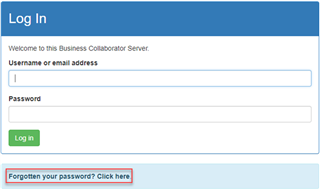
2.You will come to the first page of the password reset process. Enter your email address in the box provided and click Submit. The email address must be the one connected with your user account on BCDE.
3.You will receive an email from BCDE to the email address you entered. It will contain a password reset link. Click on the link once to go to the reset page.
4.Enter a new password twice. Your password will need to conform to the password rules displayed on the page - these rules have been set by the server administrators. Click Submit.
5.If your password has been reset successfully, you will see a Success message. Click on the Log in button to return to the login page to enter your details and log in to BCDE. In most versions of BCDE you can use your email address instead of your BCDE username to log in.
If you have any problems at all, contact your project administrator or BCDE Support