
Original Article Date: July 19, 2002
Learn how to run set of commands when you fire up MicroStation.
To run a macro or set of keyins when starting MicroStation, you can use the -s command line switch which dumps the contents of a "startup file" into the MicroStation key-in window for immediate execution.
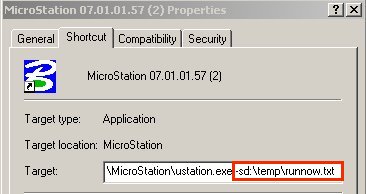
For this to work, you'll need to append the MicroStation icon command line to read:
ustation.exe -sdrive\folder\file.txt For example: -sd:\temp\RunNow.txt
 |
"d:\temp\RunNow.txt" would then contain any set of key-ins to be run immediatly when MicroStation is started:
lv=1;co=0;wt=0;lc=0;on-1-63;selv 1;fit;selv 1;macro scaletext
If you want to run the contents of the startup file during the design session, just keyin a @ followed by the name of your startup file. ie: @d:\temp\RunNow.txt. (By the way, a startup file is more commonly referred to as a script file.)
For more information about script and startup files, please refer to:
How to string keyins together or create keyin scripts
More information about command line switches can be found in:
AskInga Article #115