| Camera Settings |
- Zoom- Sets the camera focal Length.
- Exposure- Adjust the brightness of the scene.
- Used Fixed Camera height toggle option.
- Height tab for input manual value.
|
| Depth Of Field |
- Blur- Sets the Amount of camera blur Based on the depth of field distance.
- Distance- Sets the depth of the field distance for the scene used in conjunction with Blur Slider.
|
| SUN FLARE |
- Strength - Sets the strength and size of sun lens flaring.
- Size - Sets the size of the sun flaring.
|
| LIGHT FLARES |
- Strength - Sets the strength of flares for artificial lights in the scene.
- Size - Sets the size of any flares for artificial lights in the scene.
|
| ANAMORPHIC STREAK |
- Strength - Sets the strength of horizontal blue light streaks for the sun and artificial lights.
- Size - Sets the size of the horizontal blue light streaks for sun and artificial lights.
|
| SPARKLES |
- Presence - Sets the amount of presence of sparkles in the scene.
- Strength - Sets the strength of sparkles.
|
| REFLECTIONS |
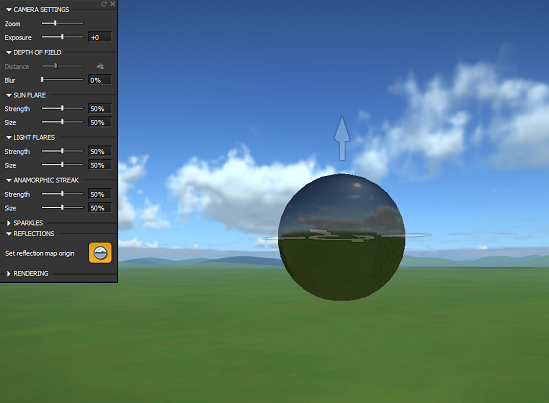
Set reflection map origin - click the reflection map icon to display the reflection map. Use the arrows to place this where you need it to be.
|
| RENDERING |
- Motion Blur - Sets the amount of motion blur used when the camera is set in motion.
- Vignetting - Sets the amount of dark picture-frame bordering which appears around the image.
- Gamma - Sets the base contrast level of the scene based on your monitor. The default of 1.8 is the standard gamma for most monitors.
- Saturation - Sets the amount of color saturation.
- Color -WB Sets the color.
- Bloom - Sets the amount of light ghosting for all scene lights including the sun, moon, and custom lights.
- Occlusion - Sets the darkness intensity of ambient shadows.
- Scotopic tab
- NPR option tab
|
| Link and Look At |
When a camera is placed inside a vehicle, this link option used in that terms. For more specification, please go through the 'Add camera inside a vehicle' section. |