On the Responses tab of a transmittal you can view all of the responses received so far for all of the documents in the package.
When you open a transmittal in ProjectWise Explorer, as long as an import storage location is defined, a copy of each file attached to the incoming responses is automatically imported to the designated subfolder for these documents in the work area.
[Note: There is no import storage location defined by default for incoming response attachments for confidential transmittals, therefore you must define this location first in the settings before these documents can be automatically imported as described above. When no import storage location is defined, there is no automatic import of incoming response attachments for confidential transmittals, however you can still manually import these documents if needed.]
- Expand the Deliverables Management node under your associated work area.
- Expand the Outgoing folder and select the Transmittals folder.
- Open a transmittal from the list and select the Responses tab.
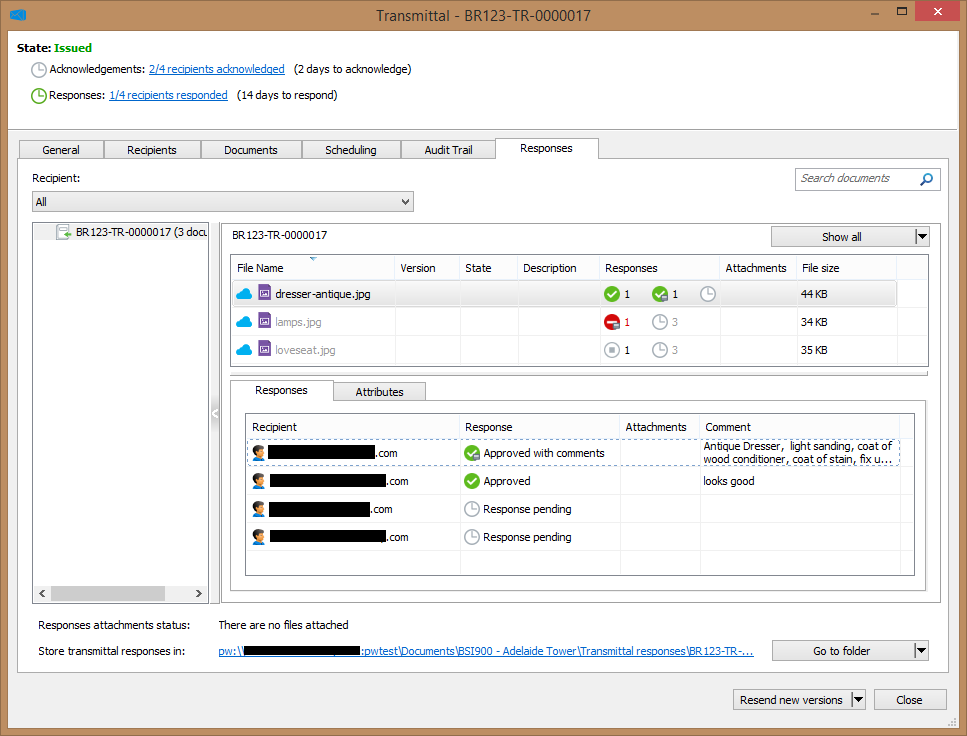
- Select whether you want to view all responses for a document (select All from the Recipient list) or just the response from a specific person (select a recipient from the Recipient list).
- Select a document in the list.
When Recipient is set to All, then all of the package recipients and their responses (if any) are displayed in the lower Responses tab that opens within the main Responses tab. When a specific recipient is selected, then only that recipient and their response (if any) is displayed.
[Note: If a response has one or more files attached and you want to find where a particular attachment was imported to, you can right-click the response and select Go to attachment copy > filename.][Note: You can also see all the responses for a particular document by right-clicking the document in the list and selecting Show responses. The Document Responses dialog opens, with a list of all the responses for the selected document.]