The people you send a transmittal to are called recipients. The recipients can be any combination of internal and/or external participants.
If you assigned a distribution rule to this transmittal on the General tab, the recipients list is automatically populated with the participants that are assigned to the selected distribution rule. You can add more recipients, but you cannot remove recipients that are automatically added through the distribution rule. If you did not select a distribution rule, then you must manually add all of your recipients.
- If the transmittal draft is not already open, go to the Drafts folder and open it now.
- Select the Recipients tab.
- Click Add recipients.
The Add recipients dialog opens.
The Participants list (upper list, not labeled) displays the current project participants. You can filter the list to show only internal participants, only external participants, or both internal and external participants.
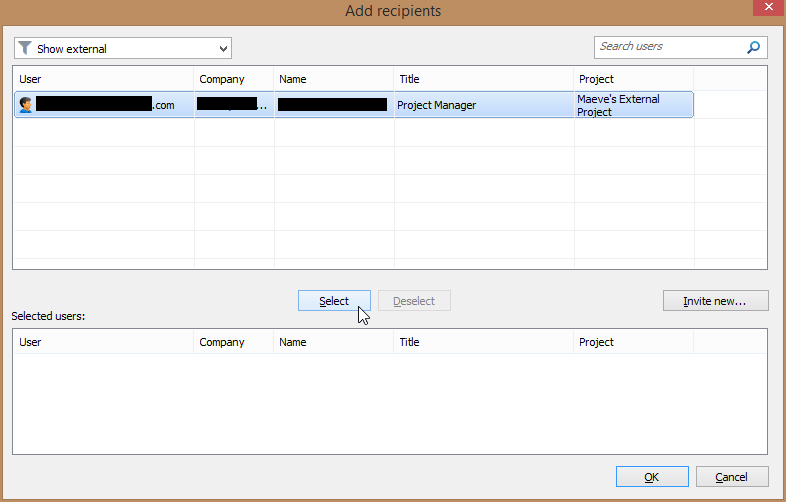
You can use this dialog to add any current internal or external participant to the recipients list.
You can also use this dialog to invite new external participants to the project. Once invited, you can immediately add the newly invited person(s) to the recipients list (you do not have to wait for them to accept the invitation in order to issue the transmittal).
- To add a current internal or external participant, select one or more users from the Participants list (upper list) and click Select.
The participants are added to the Selected users list (lower list).
- To invite and add a new external participant, do the following:
- Click Invite new.
The Invite external participant dialog opens.
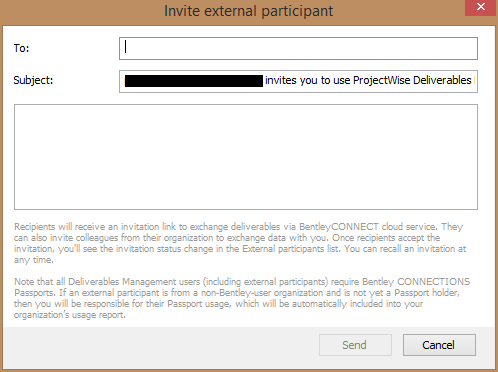
- In the Contact email field, enter the email address of the person you want to invite to this project.
- In the Subject field, enter a subject for the project invitation email.
A default subject is provided, which you can keep or change as needed.
- (Optional) In the Message field (not labeled), enter a short, personal message to the invitee.
- Click Send.
An invitation is sent to the person, and they are added to the external participants list.
- Select the newly invited external participant in the list and click Select.
The newly invited external participant is added to the Selected users list (lower list).
[Tip: If you place your cursor over the warning icon next to a newly invited external participant, it says that the person has not accepted the invitation yet, and that they will only be able to view the package after accepting the project invitation. This warning will go away once the invitee accepts the invitation.] - Click Invite new.
- When you have finished selecting internal and external participants, click OK.
The selected participants are added to the Recipients tab of the Transmittal Draft dialog.
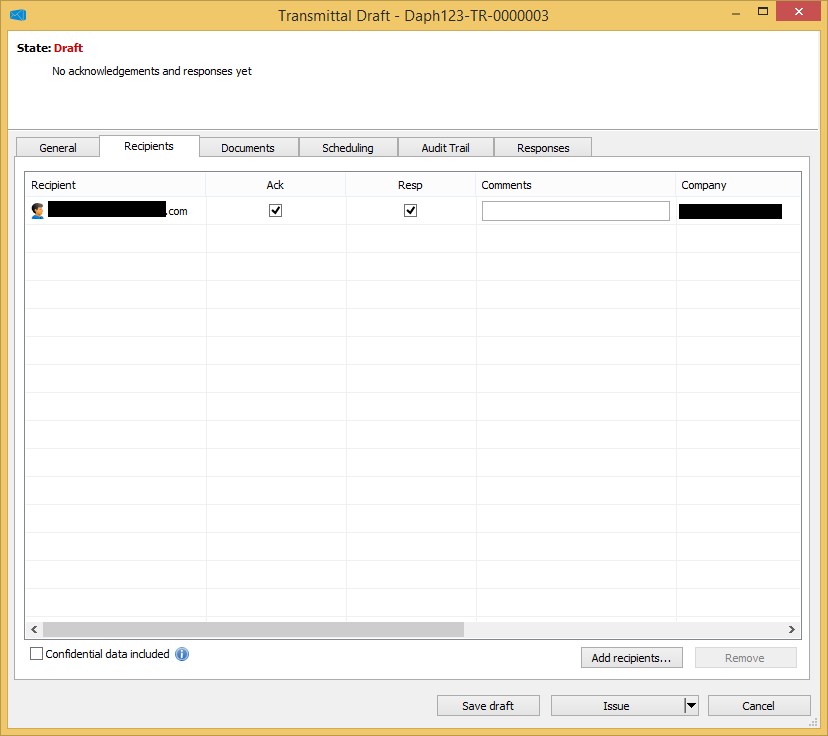
- Turn the Ack (Acknowledge) and Resp (Respond) options on or off as needed for the recipients that you manually added to the list.
The purpose selected on the General tab determines the default settings for the Ack and Resp options for manually added recipients and whether or not they can be changed. When the transmittal requires a response (as determined by the selected purpose), the Resp option is turned on by default for all manually added recipients. You can turn this off as needed for some recipients, but at least one recipient in the list must have the Resp option turned on in order to issue the transmittal. When the Resp option is off for a recipient, they cannot respond. When the transmittal does not require a response, the Resp option is disabled for all manually added recipients, and cannot be enabled.
[Note: For recipients that were automatically added to the list as the result of assigning a distribution rule on the General tab, the predefined Ack and Resp settings are fixed for those recipients and cannot be changed.] - (Optional) In the Comments field next to a recipient, enter a brief note about that person if needed.
- (Optional) If you added any participants by mistake, select them in the list and click Remove.
- (Optional) Confidential data included - Turn this option on if you want to ensure that only the recipients of this transmittal (and also additional reviewers and delegate responders) will be able to open it.
Other team members will still see a record of it (name and ID) in their list of incoming submittals, but they will not be able to open it. The administrator and the transmittal author and issuer will always have access to it.
[Tip: You can also turn this setting on from the General tab]. - When finished configuring the recipients list, click Save draft.