
| Applies To | |||
| Product(s): | MicroStation | ||
| Version(s): | 08.11.09.578 | ||
| Environment: | N\A | ||
| Area: | Programming | ||
| Subarea: | VBA | ||
| Original Author: | Tristan Anderson, Bentley Technical Support Group | ||
Because 2D drawing files can cause elements to overlap, the display order of elements through the manipulation of the elements themselves is very important.
Although there are options in the Edit menu to "Bring to Front", previous elements will be given a new value of order priority. In the ElementInfo, each element is assigned a number between 500 and -500 as shown here:
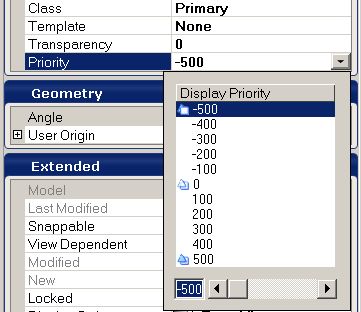
This can be awkward to deal with, so it makes sense to fix it with VBA for many elements, or multiple elements in different drawings. A common task is to make visible texts, or texts to represent all other elements to cover. When assigned to an element, it will assign it with the priority of 500, so that it is at the top and is always visible. In contrast, if the value was -500, the item would be at the bottom. Without any indication, the value 0 is used.
Here is a VBA example where all texts in the current model are brought to the top:
Sub ElementPriority()
Dim  Ee As  ElementEnumerator
Set Ee = ActiveModelReference.GraphicalElementCache.Scan
Do While Ee.MoveNext
    If  Ee.Current.Type = msdElementTypeText Then         'only change texts
        Ee.Current.AsTextElement.DisplayPriority = 500   'unit all the way "up"
        Ee.Current.Rewrite                               'saving changes
    End  If
Loop
End Sub